This article contains affiliate links. If you purchase or book through these links, we may earn a commission at no additional cost to you.
Introduction to Shopify Apps
Starting a new online store can feel like stepping into uncharted territory. With so many moving parts, from web design and inventory management to customer service and digital marketing, it’s incredibly easy to become overwhelmed. Luckily, Shopify has created a massive ecosystem of apps designed to simplify your journey and elevate your business.
Whether you’re looking to streamline your daily operations, enhance your customer experience, or jumpstart your early marketing efforts, the right tools can make all the difference. However, the Shopify App Store is brimming with thousands of options, and not every app is worth your time, your focus, or your initial investment. In fact, installing too many complex apps early on can clutter your dashboard and slow down your site’s loading speed.
In this guide, we’ll explore the essential, beginner-friendly Shopify apps that every new store owner should consider installing first. Let’s dive in and discover how these game-changing tools can set your brand up for long-term success!
Key Factors to Consider When Choosing Shopify Apps
Before you start hitting “install” on every app in the marketplace, it pays to have a strategy. Choosing the wrong tools can lead to bloated monthly subscription fees and a frustrating user experience. Here is what you should keep in mind during your shop setup:
- Identify Your Specific Needs: Every store has unique requirements based on its niche, product type, and target audience. Avoid installing apps just because they are popular; make sure they solve an immediate problem for your business.
- Prioritize User-Friendliness: As a new store owner, your time is your most valuable asset. Look for apps with clean, intuitive interfaces that save you time and reduce frustration during the initial configuration.
- Check Integration Capabilities: Seamless compatibility with Shopify and your existing theme ensures smooth operations without disruptive glitches or visual overlaps on your storefront.
- Understand Total Pricing: Keep a close eye on your budget. Some apps advertise themselves as free but come with hidden usage tiers, transaction fees, or costly premium upgrades that quickly add up as your order volume grows.
- Evaluate Customer Support & Reviews: Reliable developer assistance can make a massive difference when you run into setup issues. Always check recent user reviews to gauge how effectively the app performs in real-world scenarios.
Must-Have Apps for New Store Owners
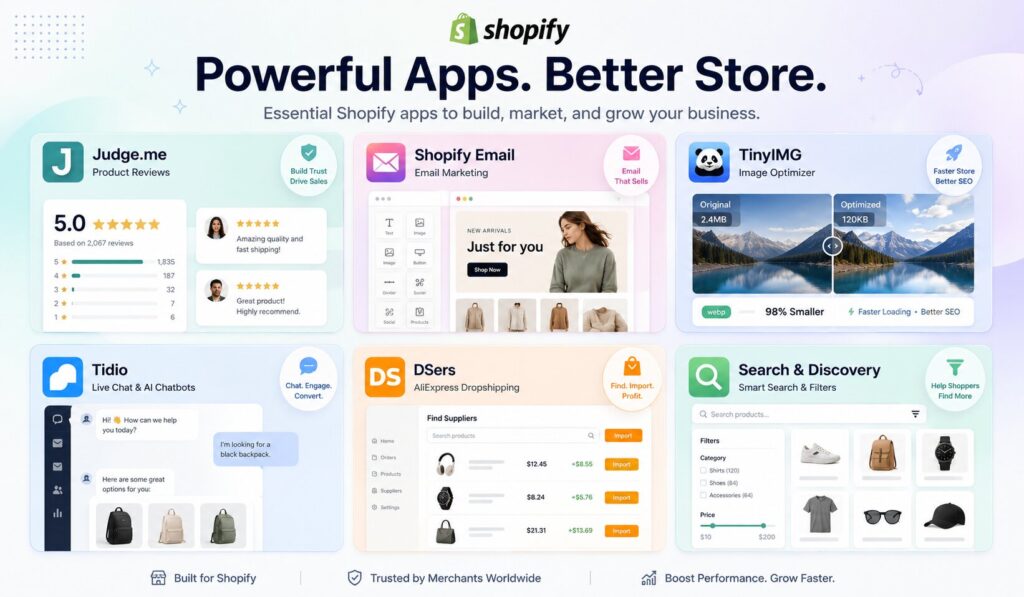
Building a solid foundation from day one means focusing on the basics: product sourcing, trust-building, speed, communication, and clear navigation.
A. DSers (The New Standard for Product Sourcing)
If you are planning to run a dropshipping business model, a reliable sourcing tool is mandatory. While older guides frequently recommend Oberlo, that platform has been officially discontinued by Shopify. Today, DSers is the premier, Shopify-endorsed replacement for importing items effortlessly.
DSers acts as a direct bridge between your Shopify store and global suppliers. It allows you to browse thousands of trending products, compare supplier pricing, and import items directly into your online shop with a single click.
The real magic of DSers happens after you make a sale. Instead of manually copying and pasting customer addresses, DSers automates the order fulfillment process. You can process bulk orders in batches, track shipments seamlessly, and sync inventory levels automatically, leaving you with more energy to focus on branding and marketing.
B. Shopify Email (Native Marketing Automation)
Building an email list is one of the most effective ways to drive repeat sales, but advanced email platforms can be incredibly intimidating and expensive for beginners. Shopify Email solves this by offering a powerful, native solution built directly into your Shopify admin panel.
With its highly intuitive drag-and-drop editor, you don’t need to be a designer or a tech expert to create stunning branded campaigns. You can pull product images, logos, and pricing details directly from your store into your emails automatically.
For new store owners, Shopify Email offers a highly competitive edge: your first 10,000 emails sent each month are completely free. This allows you to set up essential automated messaging, such as welcome emails for new subscribers and basic abandoned cart reminders, without eating into your startup capital.
C. Judge.me (Automated Product Reviews)
When a shopper lands on a brand-new website, their primary hesitation is a lack of trust. To overcome this hurdle, you need social proof, and Judge.me is one of the most cost-effective tools available for collecting authentic customer feedback.
Judge.me seamlessly integrates into your product pages, allowing you to display elegant star ratings and text reviews. What sets it apart is its completely automated request system. After a customer receives their purchase, the app sends a perfectly timed email asking for a review directly inside the email body, reducing friction and maximizing your response rates.
Furthermore, Judge.me allows buyers to upload photos and videos alongside their testimonials. In a competitive e-commerce landscape, showcasing real people using your products builds immediate credibility, helping prospective shoppers make informed, confident buying decisions.
D. TinyIMG (SEO & Image Optimization)
A beautiful website won’t generate sales if it takes too long to load. Large, unoptimized product images are the single biggest cause of slow page speeds, which frustrate users and hurt your rankings on search engines like Google. TinyIMG solves this problem quietly in the background.
TinyIMG automatically compresses your product images upon upload without sacrificing visual quality. Beyond simple compression, it acts as a comprehensive SEO manager for beginners. It helps you automatically generate image alt tags, optimize metadata, and fix broken links.
By keeping your store lightweight and fast, TinyIMG ensures a smooth browsing experience for mobile users while simplifying the complex process of search engine optimization (SEO) for new entrepreneurs.
E. Tidio (Live Chat & AI Bots)
New visitors frequently leave online stores without purchasing simply because they have an unanswered question about sizing, shipping times, or return policies. Tidio bridges this communication gap by adding a clean, professional live chat widget to your site.
Tidio allows you to manage all customer messages from a centralized dashboard or a convenient mobile app, meaning you can answer customer questions on the go. If you aren’t available to chat live, Tidio features simple, built-in AI chatbots that can handle basic customer support queries automatically 24/7.
Engaging with your audience in real-time not only prevents abandoned carts but also helps you better understand your target market’s common pain points early on. Try Tidio to understand this better.
F. Shopify Search & Discovery (Seamless Store Navigation)
If customers can’t find what they are looking for within a few seconds, they will click away. The free, native Shopify Search & Discovery app gives you absolute control over how users navigate and search through your online catalog.
With this tool, you can set up advanced product filters on your collection pages, allowing shoppers to filter items by size, color, price, or availability. It also lets you customize your store’s search results by creating search synonyms (e.g., ensuring a search for “sneakers” displays your “running shoes”) and setting up tailored product recommendations to boost product visibility.
How These Tools Synergize to Benefit Your Business
When installed together, these foundational apps work in perfect harmony to optimize your e-commerce workflow. DSers populates your store with inventory, while TinyIMG ensures those product pages load instantly. When traffic arrives, Tidio handles real-time questions, and Judge.me provides the social proof required to turn those visitors into buyers. Finally, Shopify Email steps in to retain those buyers for future product launches.
By selecting a lean, highly efficient mix of tools early on, you minimize your overhead, protect your site speed, and build a scalable foundation for your brand. Happy selling with Shopify!