This article contains affiliate links. If you purchase or book through these links, we may earn a commission at no additional cost to you.
Picture this: You have just spent fourteen hours breathing recycled cabin air, your knees are practically permanently locked, and your anxiety is simmering just below the surface. The wheels of the airplane hit the tarmac in London, Tokyo, Madrid, or Buenos Aires. You’ve done it. You are officially a study abroad student.
But as the cabin erupts into the chaotic shuffle of people grabbing their carry-ons, you pull your phone out of airplane mode, and there it is. The dreaded notification in the top corner of your screen: “No Service.”
Suddenly, the romance of moving to a new country evaporates, replaced by cold, hard panic. You need to call an Uber or figure out the local train system. You need to pull up the address to your dorm or host family. Most importantly, you need to text your parents so they know you didn’t plummet into the ocean.
In 2026, data isn’t just a luxury for scrolling TikTok; it is an absolute survival tool. Yet, the moment you land in a foreign country, you are completely cut off. This guide is about ensuring that never happens to you. We are going to break down the anxiety of the “touchdown moment” and explain why setting up an eSIM with Airalo before you ever pack your bags is the single most important tech decision you will make for your semester abroad.
The Arrival Anxiety is Real (And Expensive)
Moving to a foreign country for a semester is terrifying enough without the added stress of digital isolation. In the past, students basically had three options to get connected upon arrival, and every single one of them was flawed.
- The Carrier Extortion (International Roaming): You could just leave your home SIM card on. Your provider back home will happily let you use data in Paris, for the low, low price of $10 to $15 a day. For a student on a budget, paying upwards of $300 a month just to use Google Maps is financial sabotage.
- The Airport Kiosk Hustle: You land, clear customs, and drag your 50-pound suitcase to a brightly lit kiosk selling local SIM cards. You wait in a massive line of other confused tourists, try to translate a data plan using broken language skills, and end up paying a massive premium for a “tourist package” that expires in 14 days.
- The Wi-Fi Scavenger Hunt: The most desperate route. You refuse to pay for roaming, so you wander the airport looking for an unsecured network. You finally find the “Free Airport Wi-Fi,” only to realize it requires an SMS verification code sent to your phone number, which currently has no service. Checkmate.
With Airalo, explore the world without roaming worries. You get data the exact second you step off the plane, allowing you to focus on the excitement of your new home rather than hunting for a plastic SIM.
Airalo: Your Digital Lifeline
While there are several eSIM providers on the market, Airalo has established itself as the undisputed favorite among backpackers, digital nomads, and study abroad students.
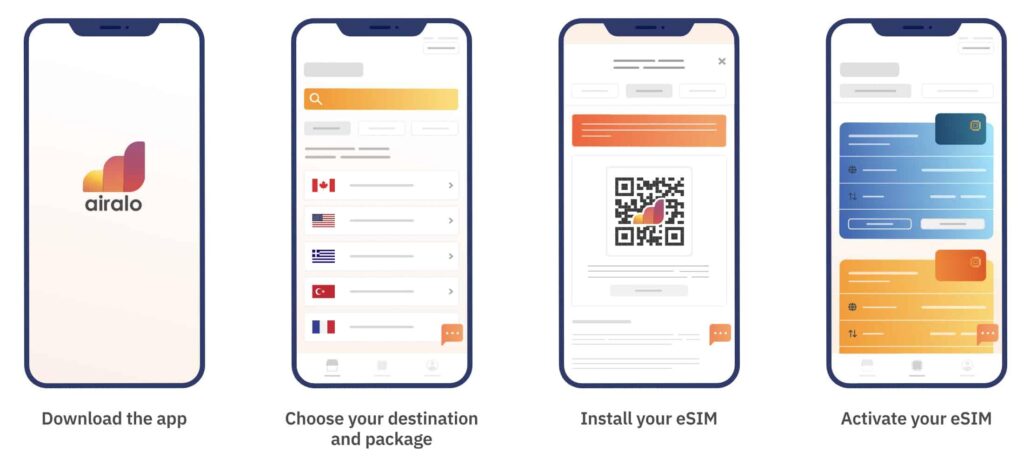
Airalo is an app store for data plans. You open the app, search for the country you are moving to, and instantly browse a menu of data packages. Moving to the UK? Grab the “Uki Mobile” plan. Heading to Japan? Download the “Moshi Moshi” package.
Why Students Choose Airalo
- The Ultimate Dual-SIM Flexibility: Modern smartphones, including the iPhone 16, 17, and recent Android flagships, allow you to keep two digital lines active simultaneously. You don’t have to choose between your home identity and local data.
- Powering Your Destination Tech Stack: Studying abroad in 2026 relies heavily on data-hungry apps. From running real-time AI voice translation during a seminar to using AI-driven itinerary planners on the fly, you need a high-speed, unthrottled connection that won’t drop mid-sentence.
- Transparent, Prepaid Pricing: Local plans are remarkably budget-friendly, often starting at around $4.50 to $5.00. Because it is strictly prepaid, there is zero risk of returning home to a surprise multi-hundred-dollar “accidental roaming” bill.
- The Budget Hack: Study abroad expenses pile up fast. Airalo keeps a standard 15% off promo active for first-time users. Don’t forget to drop that code in at checkout to shave down the cost of your initial month’s data.
The Breakdown: Old School Roaming vs. Airalo eSIM
To put the value into perspective, let’s look at the reality of a student’s first week in a new country.
| Feature | Traditional Carrier Roaming | Airalo eSIM |
| Cost | ~$10 – $15 per day | ~$5 – $20 per month (data volume varies) |
| Setup Time | Immediate (but automatic billing starts) | 5 minutes (via the app) |
| Data Speeds | Often throttled by your home carrier | High-speed, unthrottled local networks |
| The “Surprise” Factor | High. Easy to accidentally rack up hundreds of dollars. | Zero. Prepaid data means you only spend what you choose. |
Step-by-Step: Setting Up Your Phone Before You Fly
1.Check Your Carrier and Device: Do this 5 days before departure.
First, ensure your device is network unlocked. If you are on a payment plan with a carrier like Verizon or AT&T, they may restrict foreign networks. Call them and explicitly state: “I am studying abroad, please submit an unlock request for my device.”
Note for iPhone 16/17 or recent flagship users: If you bought your phone in the US, your device is likely eSIM-only and has no physical SIM slot. Your phone can host multiple eSIMs seamlessly.
2.Download, Purchase, and Lock in Your Number: Do this 3 days before departure.
Download the Airalo app, search your destination country, and select a starter plan (3GB–5GB is usually perfect for orientation week). Apply your 15% off new user promo code at checkout.
Crucial WhatsApp Step: You do not need to change your WhatsApp settings. WhatsApp binds to your original phone number, meaning you can text exactly as you do at home, even while your phone runs on foreign data.
3.Install and Label Your Profiles: Do this the night before you fly.
Follow the prompt in the Airalo app to install the eSIM profile. Because system menus change frequently on iOS and Android, look for the core setting under Settings > Cellular (iOS) or Network & Internet (Android).
When prompted by your OS, label your lines. Name your home plan “Primary” and your new Airalo plan “Study Abroad”.
4.Configure Your Default Lines: Do this at the departure gate.
Before boarding, adjust your settings to prevent accidental roaming charges on your home line:
- Set Default Voice Line to your Primary (home) number. This ensures people back home can still text your green/blue bubbles or call you in an emergency.
- Turn OFF Data Roaming specifically on your Primary carrier profile.
- Turn ON your Study Abroad eSIM line, but don’t set it as the data source just yet.
5.The Touchdown Configuration: Do this the moment the wheels hit the tarmac.
Take your phone out of airplane mode. Navigate back to your Cellular/Network settings and change Cellular Data to toggle exclusively to your Study Abroad eSIM.
Pro-Tip: Ensure Cellular Data Switching is turned OFF. This stops your phone from secretly dipping back into your expensive home network if the local signal flickers. Within 60 seconds, your local 5G bars will activate.
Beyond the First Week: Mastering Weekend Travel
Once you are settled into your dorm, the real fun begins: weekend travel.
The real fun of studying abroad is the weekend travel. If you’re in Florence, you’ll likely take trips to Paris, Munich, or Amsterdam. Instead of buying a new SIM for every border crossing, Airalo offers Regional eSIMs.
For example, the Eurolink eSIM covers 39 countries across Europe. You can buy one data package and seamlessly cross borders on a train without ever losing your connection or changing your settings. Whether you are navigating the canals of Amsterdam or looking up museum times in Berlin, your phone simply works. They offer similar regional packages for Asia, Latin America, and Africa.
Your Essential Destination Tech Stack
Once your Airalo data is live at the airport, take five minutes while waiting for your bags to configure these three essential systems:
| App Type | What to Configure | Why It Matters in 2026 |
| Navigation | Open Google Maps or Apple Maps and download the offline map area of your entire host city. | If you ever enter a deep subway system or a historic stone building with poor cellular penetration, your GPS routing will keep working flawlessly. |
| Communication | Open WhatsApp / Signal. If a prompt asks “A new SIM was detected, do you want to switch numbers?”, select KEEP ORIGINAL. | This ensures your chats, groups, and contacts remain entirely unchanged, utilizing your local eSIM data invisibly in the background. |
| AI & Translation | Download the local language pack inside your translation apps (like Google Translate or live conversational AI tools). | You will be able to point your camera at street signs, menus, or housing contracts for instant, low-latency translation without burning through your core data package. |
Start Your Adventure with Peace of Mind
Studying abroad is an incredible privilege, but it is also a massive disruption to your comfort zone. You are going to face language barriers, cultural misunderstandings, and moments of intense homesickness. You don’t need to add technological failure to that list.
Stay Connected Anywhere – Get Your Airalo eSIM Today.
By utilizing an Airalo, you are taking control of your arrival. You are eliminating the frantic search for Wi-Fi, dodging the predatory roaming charges from your home carrier, and ensuring that your very first steps in your new home are taken with confidence.
So, finish packing your bags, double-check your passport, and get your digital life in order. The world is waiting, and you’re going to need data to navigate it.